Pseudodynamics+
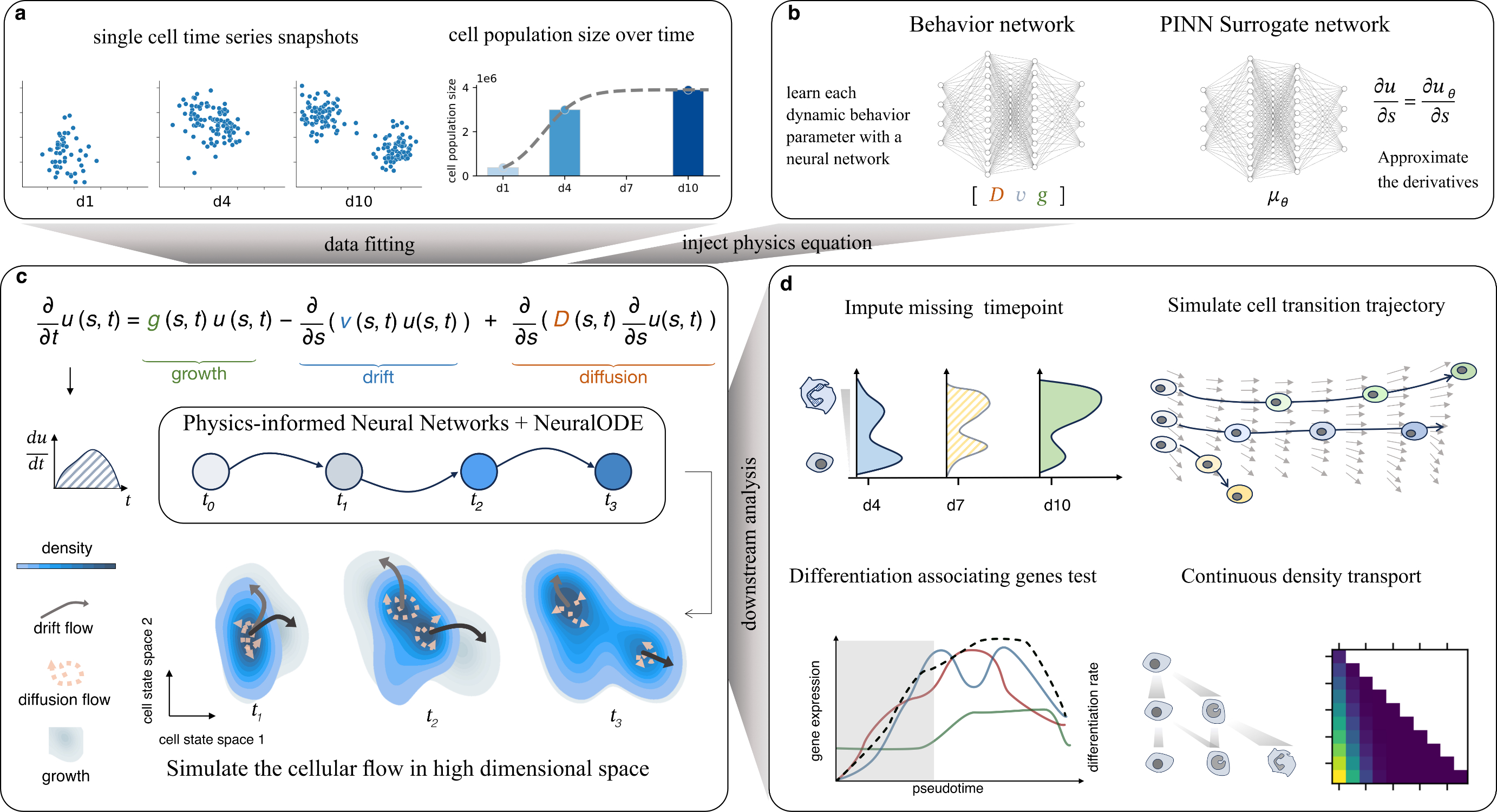
Physics Informed Neural Network based method for solving the single-cell population dynamics. For each cell, we estimate the dynamic parameter of the cell proliferation, differentiation and diffusion.
Documentation and tutorials
Full documentation, API reference, and step-by-step tutorials live on Read the Docs:
Website: https://pseudodynamics-plus.readthedocs.io
Tutorials (data preparation, config setup, downstream analysis): https://pseudodynamics-plus.readthedocs.io/en/latest/tutorials.html
Config example: https://pseudodynamics-plus.readthedocs.io/en/latest/notebooks/setup_config.html
If you are getting started, read the tutorials first — they cover the input format and the most common pitfalls.
Installation
git clone https://github.com/Gottgens-lab/pseudodynamics_plus.git
cd pseudodynamics_plus
pip install -e .
Training
Store the population size information in AnnData.uns['pop'] and save as h5ad. Configure the training settings in config.json (see the config tutorial or any V0_config.json under logs/). Then run:
# with GPU
python main_train.py --config_path config.json -G 0

# without GPU
python main_train.py --config_path config.json -G None
Training options (diffusion_improvement features)
The diffusion_improvement branch adds several opt-in training features on top of the base
PINN loss (log-density reconstruction + Fokker–Planck residual + Neural-ODE simulation). Every
flag below defaults to the pre-2026-06 behaviour, so a run launched without any of them
reproduces the original model. Pass a flag only to turn its feature on.
Growth loss
Flag |
Default |
Choices / type |
What it does |
|---|---|---|---|
|
|
|
How the growth field |
|
|
|
Reference for the observed |
|
off ( |
float |
Warm-start the growth net so |
Fokker–Planck residual
Flag |
Default |
Choices / type |
What it does |
|---|---|---|---|
|
|
|
FP residual formulation. |
|
model default |
float |
Weight balancing the PDE residual loss against the data-fit loss. |
Diffusion field D
Flag |
Default |
Choices / type |
What it does |
|---|---|---|---|
|
model default |
float |
Weight (λ_D) of the L2 penalty on |
|
off ( |
float |
Weight for the diffusion variance-matching + entropy losses (encourage |
|
off ( |
|
Hard-clamp the diffusion field into |
Velocity / optimal transport (CFM)
Flag |
Default |
Choices / type |
What it does |
|---|---|---|---|
|
off ( |
float |
Weight for the Conditional Flow Matching velocity loss (supervises |
|
off ( |
float |
If set, use unbalanced OT (marginal-relaxation |
|
model default |
float |
Weight of the Neural-ODE density-simulation loss. |
|
|
float |
Weight (λ_v) supervising |
Density estimation
Flag |
Default |
Choices / type |
What it does |
|---|---|---|---|
|
|
|
Estimator for the observed density |
|
|
int |
Max number of GMM components tested by BIC when |
Constructor-only knobs (not yet exposed on the CLI)
These are pde_params(...) arguments with no main_train.py flag; they take their class default
unless the model is constructed directly. Listed here because they affect training and are not
recorded in V0_config.json:
Argument |
Default |
Choices / type |
What it does |
|---|---|---|---|
|
|
|
|
|
— |
— |
Residual-Centered Growth: replaces the R-loss with a mean-corrected |
|
|
float/int |
RCG hyperparameters; active only when |
Reproducibility note. Training flags above are not all persisted into
logs/<exp>/V0_config.json(only the historical weight knobs are). To reproduce a run exactly, record the full command line, or pin the flags explicitly. For a clean ablation that varies only one parameter, fix every other flag to the same value across arms.
Branches
main— stable release used by the docs andpip install.diffusion_improvement— active development branch with the latest improvements to the diffusion term, new training scripts, and ongoing experiments. Check this branch if you want the most recent features or want to reproduce results from the current manuscript revision.
git checkout diffusion_improvement
Updates
Reverse-chronological log of the latest functionality on diffusion_improvement.
2026-06-16 — main_train_rcg.py: clean RCG training entry point
A dedicated training script for the RCG (Residual-Centered Growth) PINN, kept separate from
main_train.py so RCG runs launch without the original script’s config-override foot-guns:
--configis merged with CLI args — unspecified CLI flags no longer clobber config values.Exposes every RCG flag and ships defaults that match the recommended launch config (
--residual_modedefaults torcg,--growth_loss_modetologratio).Runs the CFM loop once (
cfm_loops=1) and uses the batch-size-invariant diffusion penalty (d_penalty_mode='mean', i.e.D.pow(2).mean()).--gpu_devicesdefaults to"0".
python main_train_rcg.py --dataset <h5ad_stem> --config logs/<exp>/V0_config.json
The RCG residual mode itself (residual_mode='rcg' — mean-corrected ginv target plus a
relmass magnitude anchor) is documented in the Constructor-only knobs table above.
Reproducible configs and checkpoints
The logs/ directory contains the exact configs and trained checkpoints for every experiment in the manuscript and rebuttals (Klein, Tom, cord blood, synthetic Fokker–Planck, ablations, etc.). Each experiment directory follows the same layout:
logs/<experiment_name>/
├── V0_config.json         # training config used to reproduce the run
└── lightning_logs/        # PyTorch Lightning checkpoints and metrics
To reproduce a run, point main_train.py at the stored config:
python main_train.py --config_path logs/<experiment_name>/V0_config.json -G 0
Important resources
Learn more about pseudodynamics+.
Find a detailed documentation of pseudodynamics+.
Check out how to use pseudodynamics+.